
Short answer
Surfer is a strong pick for teams that publish often and want content optimization plus AI visibility tracking in one place. Standard ($99/mo billed yearly) is the sweet spot for most, but note it tracks AI prompts in ChatGPT only, weekly. If you write a few posts a month, start with Discovery ($49/mo) or a cheaper tool.
Top picks
Prices checked October 2026
- Best for most
Surfer Standard
Most content teams
Starts at $99/mo billed yearly
Try Surfer - Cheapest plan
Surfer Discovery
Solo writers testing Surfer
Starts at $49/mo billed yearly
Start with Discovery - Best for AI tracking
Surfer Pro
AI visibility across all models
Starts at $182/mo billed yearly
See Surfer Pro
On this page
What Surfer is
Surfer started as a content optimization tool. You give it a keyword, it looks at the pages ranking for it, and its Content Editor tells you which terms, headings and length to aim for, scored as a Content Score. Over time it added an AI writer (Surfy), an AI detector and humanizer, a plagiarism checker, internal linking, a Topical Map, audits and, most recently, AI visibility tracking in ChatGPT, Perplexity, Gemini, Google AI Mode and AI Overviews.
So in 2026 Surfer is two things: a content workflow tool and an AI search tracker. The plans mix both, which is why choosing one takes a little care.
Surfer pricing in 2026
These are the prices on the Surfer pricing page, checked in October 2026. All are per month, billed yearly.
| Plan | Price (yearly) | Documents | AI prompts tracked | Seats | Pages tracked | Link |
|---|---|---|---|---|---|---|
| Our pickDiscovery | $49 | 120 | None | 1 | 10 | Try Surfer |
| Standard | $99 | 360 | 25, ChatGPT only, weekly | 3 | 50 | Try Surfer |
| Pro | $182 | 360 | 50, all models, daily | 5 | 200 | Try Surfer |
| Peace of Mind | $299 | Unlimited (fair use) | 100, all models, daily | 10 | 500 | Try Surfer |
| AI Search Analytics | $82 | None | 50, all models, daily | 5 | Not listed | Try Surfer |
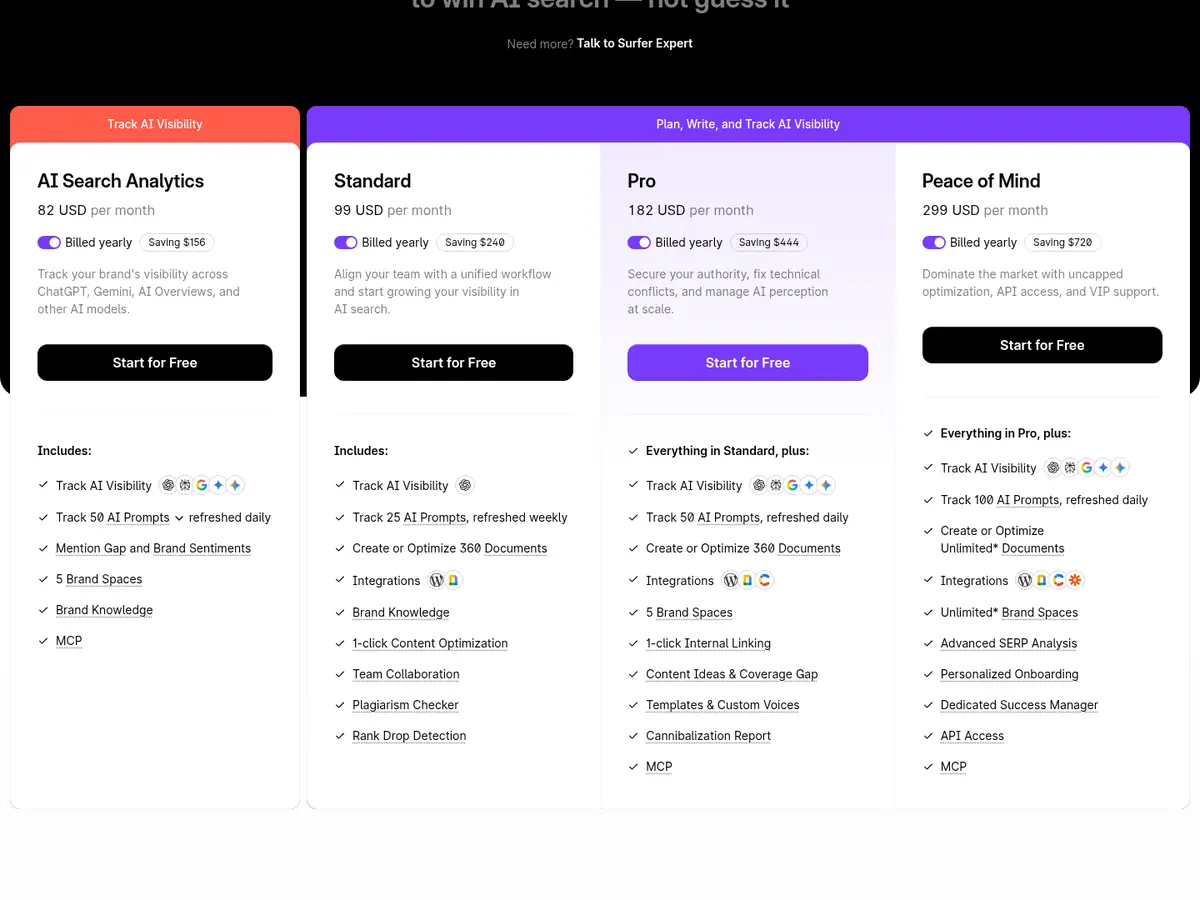
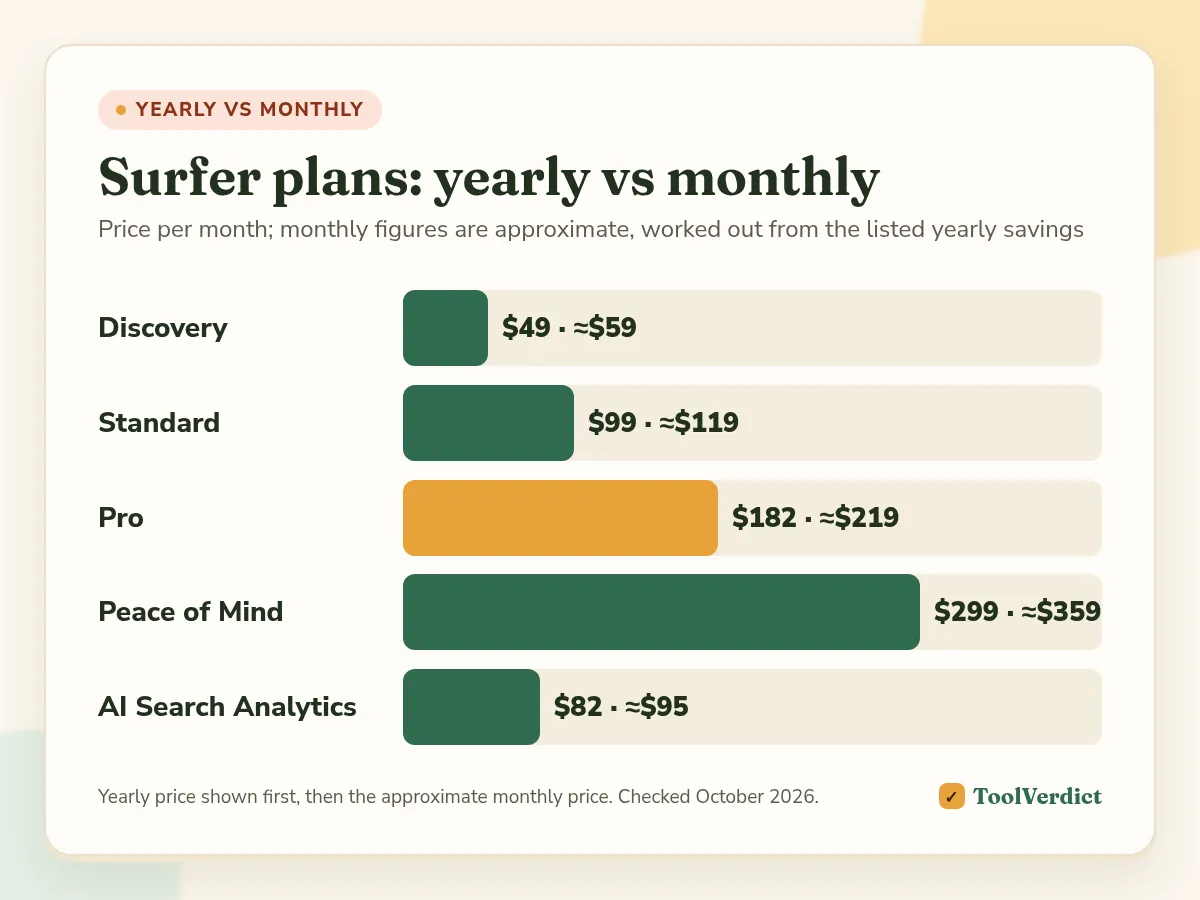
The page also shows the yearly saving for each plan: $120 on Discovery, $240 on Standard, $444 on Pro, $720 on Peace of Mind and $156 on AI Search Analytics. That puts the monthly prices at roughly $59, $119, $219, $359 and $95. Enterprise is custom, with SSO, white label and custom limits.
What each plan unlocks
Discovery ($49)
The entry plan: 120 documents, the Content Editor with Content Score, Surfy the AI writing assistant, the AI detector and humanizer, plagiarism checks and 1-click optimization. One seat, 10 tracked pages, no AI prompt tracking. It's a sensible way to test Surfer if you write alone.
Standard ($99)
Three times the documents (360), 3 seats, 50 tracked pages, WordPress and Google Docs integrations, team collaboration, rank drop detection and 25 AI prompts tracked weekly in ChatGPT. For most small content teams this is the plan.
Pro ($182)
Same 360 documents, but 5 seats, 200 tracked pages, 5 brand workspaces, 10 custom templates, custom voices, a cannibalization report, Contentful integration and MCP. The big change is AI tracking: 50 prompts across all models, refreshed daily.
Peace of Mind ($299)
Unlimited documents under a fair use policy, 10 seats, 500 tracked pages, 100 daily AI prompts, unlimited brand workspaces, Zapier, API access, personalized onboarding and a dedicated success manager.
AI Search Analytics ($82)
For teams that only want AI visibility: 50 prompts across ChatGPT, Gemini, Perplexity, AI Mode and AI Overviews, refreshed daily, with mention gaps, brand sentiment and 5 brand spaces. No content documents.
Key features
- Content Editor and Content Score: the core of Surfer. It scores your draft against the top results and lists terms and headings to add.
- Surfy and the humanizer: AI writing help inside the editor, plus a detector and humanizer for AI-assisted drafts.
- 1-click optimization and internal linking: Surfer can insert missing terms and suggest internal links for you. Review the changes; automatic edits still need a human eye.
- Topical Map and keyword research: cluster ideas for a site, useful when planning a content hub.
- Content Audit and rank drop alerts: check live pages and get warned when rankings fall.
- AI Tracker: shows how often AI models mention your brand, your position in their answers, the sources they cite and the competitors they name.
- Integrations: WordPress and Google Docs from Standard, Contentful from Pro, Zapier and API on Peace of Mind.
Pros and cons
Pros - Mature content optimization workflow with a clear score - Content and AI visibility in one subscription - Team features (seats, comments, version history) from Standard - Easy to cancel auto-renewal from Billing
Cons - Standard's AI tracking covers ChatGPT only, and only weekly - The best prices need a year paid upfront - No PayPal; cards, plus bank transfer on yearly plans - Optimizing to a score can push writers toward keyword stuffing if nobody edits
Is Surfer SEO worth it?
It depends on how much you publish.
- 4 or more articles a week, a small team: yes. Standard pays for itself in saved briefing and editing time, and 360 documents gives you room.
- You care about AI search across all engines: Pro, or AI Search Analytics if you don't need the content tools.
- A few posts a month, solo: Discovery, or a cheaper optimizer like NeuronWriter.
- You mainly need keyword research, rank tracking and audits: Surfer isn't that tool. An SEO suite like SE Ranking fits better, and it has its own content toolkit.
Surfer vs the alternatives
| Tool | Entry price | Best for | Link |
|---|---|---|---|
| Our pickSurfer | $49/mo yearly | Content teams that also want AI tracking | Try Surfer |
| NeuronWriter | $23/mo | Budget content optimization | NeuronWriter |
| Frase | $39/mo yearly | Research and briefs | Frase |
| Clearscope | $129/mo | Large editorial teams, unlimited users | Clearscope |
| SE Ranking | $103.20/mo yearly | Full SEO suite with content tools | Try SE Ranking |
We cover each one in detail in Surfer SEO alternatives, and the wider field in best AI SEO tools.
Billing, cancellation and payment
From Surfer's FAQ, as read in October 2026:
- Auto-renewal: plans renew automatically. You can turn auto-renewal off in Billing and keep access until the end of the paid period.
- Annual plans: paid upfront for the year, with savings of up to 17% against monthly.
- Credits: on annual plans, credits reset yearly or when you change plans.
- Plan changes: upgrade or downgrade any time in the app.
- Payment methods: cards for monthly and yearly plans, bank transfer for yearly only. No PayPal.
How to get the most from a Surfer trial or first month
- Pick 5 existing articles that rank on page 2 and run them through the Content Editor.
- Update them, publish, and note the dates.
- Set up AI tracking for 10 to 25 prompts your buyers actually ask.
- Check Search Console after 4 to 6 weeks for impressions and position changes.
- Decide on the plan based on documents used, not on features you never opened.
How we reviewed Surfer
In October 2026 we read the full Surfer pricing page, its plan comparison table and FAQ, and the AI Tracker product page. We recorded plan prices, document limits, seats, AI tracking engines and refresh rates, billing and cancellation rules. We compared those with the official pricing pages of NeuronWriter, Frase, Clearscope and SE Ranking.
We didn't run a long hands-on test for this review, so we don't give a star rating and we don't make claims about ranking gains. Surfer's own claims (such as user counts and G2 ratings) are reported as Surfer's.
We earn a commission if you buy Surfer or SE Ranking through our links. See our affiliate disclosure.
Frequently asked questions
Is Surfer SEO worth it in 2026?
It's worth it if you publish content every week and want one tool for briefs, writing, optimization and AI visibility. If you write a few posts a month, Discovery at $49/mo or a cheaper tool like NeuronWriter will do.
How much does Surfer SEO cost?
Billed yearly, Discovery is $49/mo, Standard $99/mo, Pro $182/mo and Peace of Mind $299/mo. AI Search Analytics on its own is $82/mo. Monthly billing costs more: the page shows yearly savings of $120 to $720.
Does Surfer have a free trial?
The pricing page has a "Start for Free" button on every plan, but it doesn't spell out a trial length or limits. Check what the free start includes at signup before you plan a project around it.
Can I cancel Surfer any time?
Yes. Plans renew automatically, and you can switch off auto-renewal in Billing. You keep access until the end of the period you paid for. Annual plans are paid upfront for the full year.
Does Surfer accept PayPal?
No. According to Surfer's FAQ you can pay by card for monthly and yearly plans, and by bank transfer for yearly plans only. PayPal isn't offered.
What's the best Surfer alternative?
NeuronWriter is the cheapest close alternative, from $23/mo. Frase is good for briefs and research, and Clearscope suits larger editorial teams. See our full Surfer SEO alternatives guide.
The verdict
Surfer is still one of the most complete content optimization tools, and its AI tracking makes it more useful than a year ago. Standard is the right plan for most teams, as long as ChatGPT-only weekly tracking is enough. If you need every AI engine daily, budget for Pro. If you publish little, start with Discovery and move up when you run out of documents.