
Short answer
If you already use SE Ranking, its Keyword Grouper is the cheapest SERP-based clustering we found: $0.004 per keyword, so $4 per 1,000. Without a suite, KeyClusters is the easiest pay-as-you-go option and its credits never expire. Keyword Insights is worth it if you also want intent labels and content briefs. This guide compares official prices and methods. It isn't a hands-on accuracy test.
Top picks
Prices checked November 2026
- Cheapest per keyword
SE Ranking
Lowest cost per keyword, inside a full SEO suite
Starts at $0.004 per keyword + plan from $103.20/mo (annual)
Try free for 14 days - Best pay-as-you-go
KeyClusters
Pay as you go, no subscription
Starts at $19 for 2,500 keywords
KeyClusters - Best for briefs
Keyword Insights
Clusters plus intent and briefs
Starts at $58/mo for 10,000 credits
Keyword Insights pricing
On this page
- Keyword clustering tools: comparison table
- What clustering 10,000 keywords costs
- How keyword clustering tools group keywords
- Thresholds: how many shared URLs are enough
- SE Ranking Keyword Grouper
- Keyword Insights
- KeyClusters
- Keyword Cupid
- LowFruits
- ContentGecko
- Keywords People Use
- Semrush and Ahrefs: clustering inside the big suites
- Keyword mapping tools: from clusters to pages
- How to choose a keyword clustering tool
- How we compared these tools
- FAQ
- The bottom line
Keyword clustering tools compared
We opened each vendor's pricing page or help docs on November 2, 2026. "Cost per 1,000" is simple math from list prices: the price divided by the keywords you can cluster with it. It assumes you use every credit you pay for.
| Tool | How it charges | Cost per 1,000 keywords | Method | Free option | Link |
|---|---|---|---|---|---|
| Our pickSE Ranking Keyword Grouper | $0.004 per keyword from account balance, plan required | $4, or $9 with volume check | SERP, soft or hard | 14-day trial | Try SE Ranking |
| Keyword Insights | Monthly credits, 1 credit per keyword | $5.80 (Basic), $4.95 (Professional) | SERP clustering + intent | $1 trial, up to 500 keywords | Keyword Insights |
| KeyClusters | One-off credit packs, never expire | $7.60, $5.50 or $3.50 by pack | SERP, 3+ shared URLs | No | KeyClusters |
| Keyword Cupid | Monthly credits + extra credits | $6 to $20 per 1,000 extra | SERP-based | No | Keyword Cupid |
| LowFruits | Credits: 1 SERP = 1 credit | $5 to $12.50 (PAYG), $6.25 (Premium, yearly) | SERP, 40% default overlap | No | LowFruits |
| ContentGecko | Free tool, or €19.90/mo for 50,000 credits | Free up to 200; €0.40 at full use | SERP, adjustable overlap | 200 keywords per run | ContentGecko |
| Keywords People Use | Plans with credits; Unlimited includes 50,000/mo | $5.98 on Unlimited at full use | Clusters inside the tool | 7-day trial | Keywords People Use |
| Semrush Keyword Strategy Builder | Included in SEO plans, monthly action limits | No per-keyword price | Clusters + topic map | No | Semrush pricing |
| Ahrefs Keywords Explorer | Included from Standard ($249/mo) | No per-keyword price | Keyword clusters | No | Ahrefs pricing |
Two notes before you read the cheapest number and buy. SE Ranking's $4 only makes sense if you already pay for a plan, or want one for tracking and audits. And subscription credits from Keyword Insights, Keyword Cupid and LowFruits don't roll over, so the real cost per 1,000 goes up in months when you cluster less.
What clustering 10,000 keywords costs
Most people don't cluster a neat 1,000. A new niche site or a client audit is usually a few thousand to tens of thousands of keywords. Here is the cheapest way we found to cluster 10,000 keywords once with each tool, using list prices:
| Tool | Cheapest way to cluster 10,000 | Total | Per 1,000 |
|---|---|---|---|
| SE Ranking | 10,000 x $0.004 from balance (plan billed separately) | $40 | $4.00 |
| Keyword Insights | Basic plan, 10,000 credits, monthly | $58 | $5.80 |
| LowFruits | Premium, 10,000 credits, billed yearly | $62.45 | $6.25 |
| KeyClusters | Four 2,500 packs at $19 | $76 | $7.60 |
| LowFruits | Pay-as-you-go 10,000 credits | $100 | $10.00 |
| Keyword Cupid | Freelancer ($49.99, 5,000 credits) + 5,000 extras at $0.010 | $99.99 | $10.00 |
| ContentGecko | Paid plan, 50,000 credits a month | €19.90 | €1.99 |
| Keywords People Use | Unlimited plan (clustering of 50,000/mo) | $299 | $29.90 |
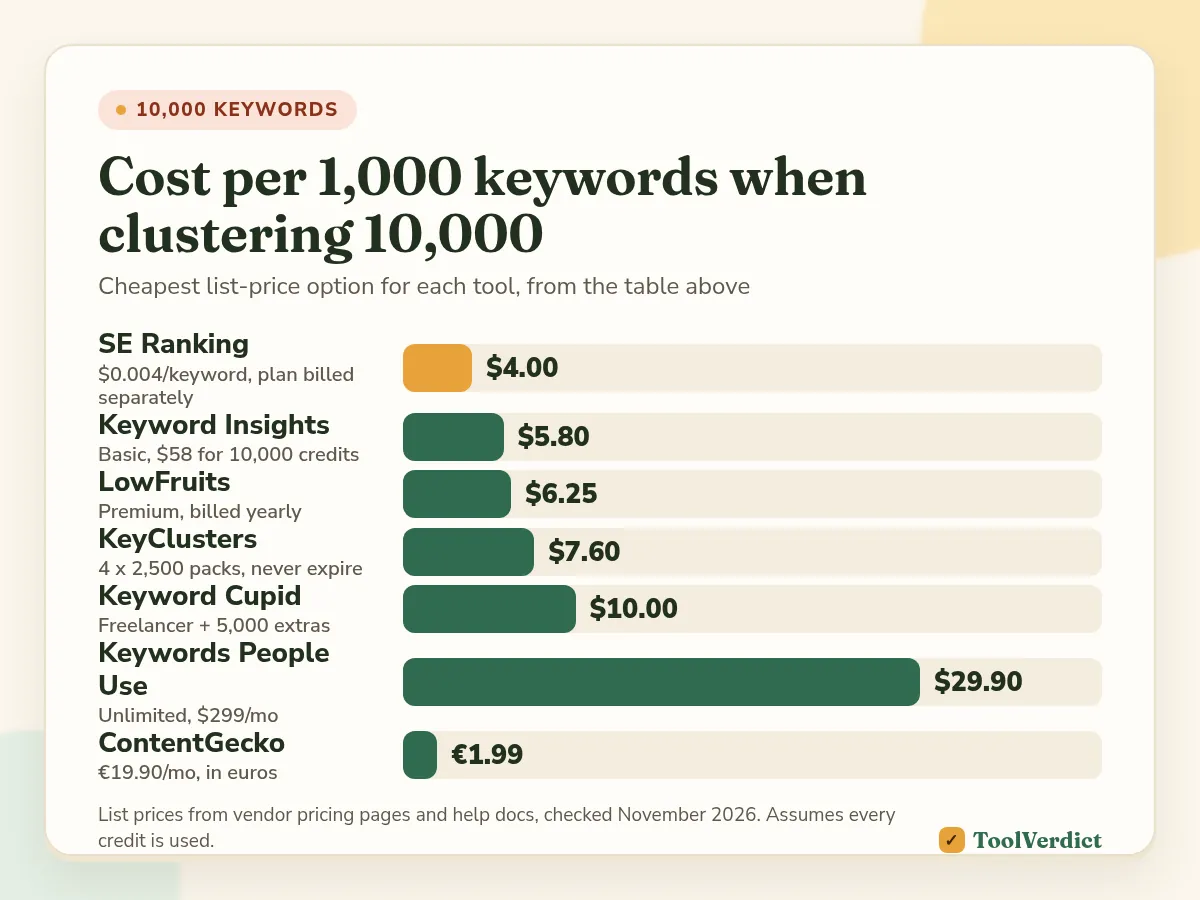
The math changes with volume. KeyClusters drops to $3.50 per 1,000 if you buy the 100,000 pack for $350, and those credits never expire. ContentGecko gets very cheap if you actually use its 50,000 monthly credits. And SE Ranking costs $9 per 1,000 if you let it pull search volume as well ($0.005 more per keyword). You don't need that if your keyword export already has volume, because you can upload it in the file.
How keyword clustering tools group keywords
Every tool on this list does one of two things, or both.
SERP-based clustering checks Google's top 10 results for every keyword. If two keywords share enough of the same ranking URLs, they go in one group. The logic is simple: if Google ranks the same pages for both, one page on your site can probably rank for both too. It costs money because every keyword needs a live SERP check, which is why tools charge per keyword or per credit.
Semantic clustering groups keywords by meaning or by the words they share. It's quick and often free, and it works without any SERP data. But it can only guess what Google does. "Cheap flights to Rome" and "Rome flight deals" may look different to a word-matcher and identical to Google. "Apple storage" can mean an iPhone setting or a fruit cellar.
An illustrative example
The example below is illustrative. We made it up to show how the two methods can disagree. It isn't output from any tool.
Say you have six keywords about running shoes: "running shoes for flat feet", "best running shoes flat feet", "flat feet running shoes women", "overpronation running shoes", "stability running shoes" and "arch support insoles running".
| Keyword | Semantic grouping (shared words) | SERP grouping (shared top-10 URLs, hypothetical) |
|---|---|---|
| running shoes for flat feet | Group A: "flat feet" | Group 1 |
| best running shoes flat feet | Group A: "flat feet" | Group 1 |
| flat feet running shoes women | Group A: "flat feet" | Group 2: women's pages rank |
| overpronation running shoes | Group B: "overpronation" | Group 1 |
| stability running shoes | Group C: "stability" | Group 1 |
| arch support insoles running | Group D: "insoles" | Group 3: product pages for insoles |
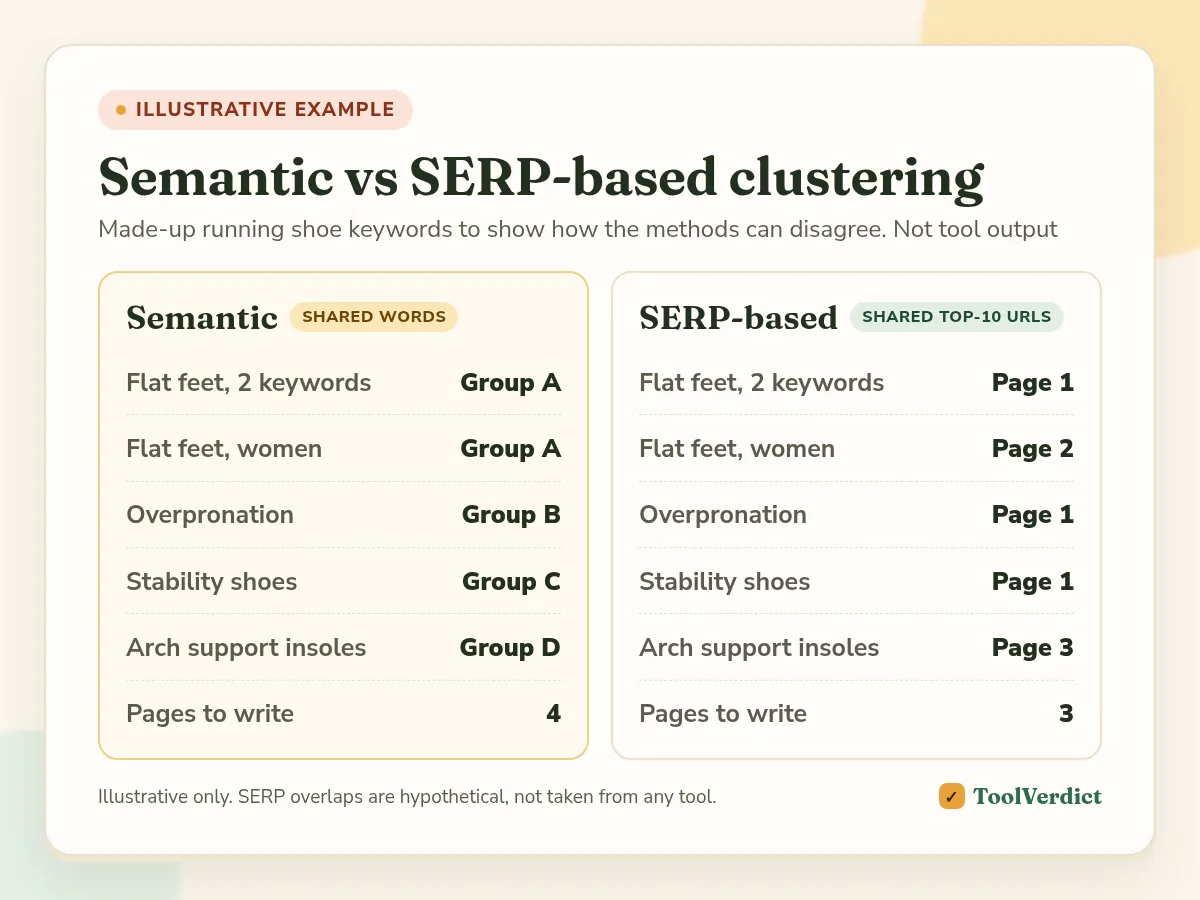
The semantic version gives you four pages, and three of them are the flat feet, overpronation and stability guides. If Google really ranks the same articles for all three (the hypothetical SERP column), those are one page. Three thin pages would compete with each other. The SERP version also splits off the women's query, because in our made-up SERP Google shows women-specific pages for it. A word-matcher would never catch that.
That's the real value of SERP clustering: it tells you how many pages to write, not just which words go together.
SE Ranking Keyword Grouper: cheapest per keyword if you have a plan
SE Ranking is a full SEO suite with rank tracking, keyword research, backlinks, audits and AI visibility tracking. Its Keyword Grouper is a SERP-based clustering tool inside the keyword research section. It's paid from your account balance, not from plan limits.
According to SE Ranking's help center, one check costs $0.004. If you let the tool fetch search volume, the price goes up by $0.005 per query. You choose country, location and language, the minimum number of matching URLs and the soft or hard method. You can upload a file with your own volumes, and the tool also shows the words Google highlights in the results for each keyword.
The catch is the plan. Core is $129/mo, or $103.20/mo billed annually, and Growth is $279/mo ($223.20 annually). If you only want clustering, that's an expensive way to get $4 per 1,000 keywords. If you'd pay for a suite anyway, it's the cheapest clustering on this list.
Pros
- $0.004 per keyword, the lowest per-keyword price we found among SERP-based tools
- Soft and hard grouping plus an adjustable URL threshold
- Clusters, rank tracking and audits live in one account
- Free 14-day trial, no credit card needed
Cons
- You need a paid plan, so it isn't a standalone clustering tool
- Volume checks add $0.005 per keyword
- No intent labels or content briefs on top of the clusters
We cover plans and limits in our SE Ranking review. If you run client work, see what it costs with client seats in best SEO tools for agencies.
Keyword Insights: best for clusters plus intent and briefs
Keyword Insights is a dedicated clustering and content tool. It clusters keywords, labels search intent and can turn a cluster into a brief or a draft.
The pricing page lists Basic at $58/mo with 10,000 credits, 1 seat and 5 workspaces, and Professional at $99/mo with 20,000 credits and 3 seats. Enterprise is custom. Annual billing saves 20%. Clustering costs 1 credit per keyword. A brief costs 100 credits, the writing assistant 200 and the AI writing agent 1,200, so the content features eat into the same pool.
There's a $1 trial for 7 days with 5,000 one-time credits. Clustering on the trial is capped at 500 keywords.
Pros
- One credit per keyword is easy to budget
- Intent labels and briefs come from the same clusters
- Multiple seats on Professional
- $1 trial is enough to test a real 500-keyword list
Cons
- Monthly credits are shared with briefs and writing tools
- At $58 a month it's pricey if you cluster only a few hundred keywords
- Unused monthly credits don't carry over
KeyClusters: best pay-as-you-go clustering
KeyClusters does one thing. You upload a keyword file, it checks the live top 10 for each keyword, and you get an Excel file with clusters.
The KeyClusters site is clear about the model: 1 credit = 1 keyword, no subscription, no auto-renewal, and credits never expire. Packs cost $19 for 2,500 keywords, $110 for 20,000 and $350 for 100,000. That's $7.60, $5.50 and $3.50 per 1,000. It accepts exports from Ahrefs and Semrush or your own file, and you can target a country and desktop or mobile results.
The grouping rule is fixed: 3 or more shared URLs in the top 10. That's a sensible default, but you can't tighten it for a messy list.
Pros
- No subscription, credits never expire
- $3.50 per 1,000 on the biggest pack
- Simple upload-and-download workflow
- Geo and device targeting
Cons
- Fixed threshold, no soft or hard choice
- Output is a spreadsheet, not a full workspace
- No free plan to test it on
Keyword Cupid: best for very large reports
Keyword Cupid is a SERP-based clustering platform for agencies and content teams. Its plans set a monthly credit allowance and a maximum report size.
From the Keyword Cupid pricing page:
| Plan | Price/mo | Credits/mo | Extra credit | Max keywords per report | Users |
|---|---|---|---|---|---|
| Starter | $9.99 | 500 | $0.020 | 2,000 | 1 |
| Freelancer | $49.99 | 5,000 | $0.010 | 20,000 | 5 |
| Agency | $149.99 | 20,000 | $0.007 | 40,000 | 10 |
| Enterprise | $499.99 | 80,000 | $0.006 | 80,000 | 20 |
Monthly credits reset each month. Extra credits bought on demand don't expire, but you need an active subscription to buy them. Plans include SERP geotargeting.
Pros
- Reports up to 80,000 keywords on Enterprise
- Several users from the Freelancer plan up
- Extra credits don't expire
Cons
- Starter works out to about $20 per 1,000 keywords
- You need a subscription to buy extra credits
- Monthly credits don't roll over
LowFruits: best for niche sites that also need weak SERPs
LowFruits is best known for finding keywords where weak sites and forums rank. It also has a keyword clustering tool that works on the SERPs you've already pulled.
According to LowFruits' docs, SERP clustering groups keywords that share at least 40% of top-10 URLs with the cluster's main keyword, and you can change that threshold. It needs the SERPs to be extracted first, and 1 SERP costs 1 credit.
On the pricing page, Standard is $20.75/mo billed yearly with 3,000 credits a month, and Premium is $62.45/mo billed yearly with 10,000. Subscription credits don't roll over. Pay-as-you-go credits cost $25 for 2,000, $60 for 5,000, $100 for 10,000 and $250 for 50,000, and they expire after a year. There's a 14-day money-back guarantee if you've used fewer than 100 credits.
Pros
- Adjustable overlap threshold and number of results
- Pay-as-you-go option for one-off projects
- The same SERP data also shows weak spots in the results
Cons
- Small PAYG packs cost $12.50 per 1,000
- Pay-as-you-go credits expire after one year
- Clustering is one feature in a broader keyword tool, not the main product
ContentGecko: best free keyword clustering tool
ContentGecko offers a free SERP-based clustering tool. It fetches Google's top 10 for each keyword in your chosen country and language and groups keywords by shared results.
On the ContentGecko clustering page, the free version clusters up to 200 keywords per run with a minimum SERP overlap setting. The paid version is €19.90 a month for 50,000 keyword credits, up to 20,000 keywords in one run, intent, page type and funnel-stage labels, and reclustering with new settings without spending credits.
Pros
- Free for 200 keywords per run
- Paid plan is cheap if you use the credits
- Recluster without paying twice
Cons
- 200 keywords is too small for a full site plan
- Paid plan bills in euros
Keywords People Use: best if you research questions first
Keywords People Use pulls questions from People Also Ask, autocomplete, Reddit and Quora, and has keyword clustering built in.
The pricing page lists Lite at $15/mo (150 credits), Standard at $39 (500), Pro at $79 (1,500) and Unlimited at $299, which includes clustering of 50,000 keywords a month. Yearly billing gives 2 months free. There's a 7-day trial and a 30-day money-back guarantee. Every plan lists keyword clusters, but the pricing page doesn't say how many credits clustering uses on the lower plans.
Pros
- Question research and clustering in one place
- Unlimited users on every plan
- 30-day money-back guarantee
Cons
- Clear clustering volume only on the $299 Unlimited plan
- Expensive per 1,000 if clustering is all you need
- Semrush and Ahrefs: clustering inside the big suites
If you already pay for Semrush or Ahrefs, check their built-in clustering before you buy anything else.
Semrush Keyword Strategy Builder clusters keyword lists and builds a topic map with pillar pages and subpages. According to Semrush's knowledge base, it needs a paid SEO plan and counts each structuring of a list as one action against a monthly limit. Uploaded lists are capped at 2,000 keywords, and imported lists get clusters but not the full topic map. The SEO plan is $139/mo, or $117.33/mo billed annually.
Ahrefs lists keyword clusters in Keywords Explorer on the Standard plan ($249/mo) and up, not on Lite.
Neither charges per keyword. The limits are the catch: 2,000 keywords per Semrush list is fine for one topic and tight for a whole site. For a deeper comparison of the two suites, see Semrush vs Ahrefs.
Keyword mapping tools: from clusters to pages
Clustering tells you which keywords belong together. Keyword mapping decides which URL gets each cluster. Most "keyword mapping tools" are clustering tools plus a spreadsheet, so here's the workflow that works with any of them:
- Export your clusters with the main keyword, total volume and keyword list for each.
- Add the URL that already ranks. Pull your Search Console queries or a rank tracker report and look up which of your pages ranks for each cluster's main keyword.
- Decide one action per cluster: update an existing page, create a new page, or merge pages.
- Watch for two pages on one cluster. If two of your URLs rank for keywords in the same cluster, that's possible cannibalization. Pick one page and redirect or rework the other.
- Write the brief from the cluster, not from one keyword. The secondary keywords become subheadings and FAQ entries.
SE Ranking and Semrush help with steps 2 and 4 because rankings and clusters sit in the same account. Keyword Insights covers step 5 with its briefs. For the rest, a spreadsheet with columns for cluster, main keyword, volume, current URL and action is all you need.
How to choose a keyword clustering tool
Three questions narrow it down quickly.
Do you already pay for a suite? On SE Ranking, use the Keyword Grouper. On Semrush or Ahrefs, try the built-in clusters first and only buy a separate tool when you hit the limits.
How often do you cluster? Once in a while: KeyClusters, because the credits never expire. Every month: Keyword Insights or Keyword Cupid, where a subscription gives you a steady allowance.
What do you do after clustering? If the next step is writing, Keyword Insights' briefs save time. If it's tracking rankings for each cluster, a suite like SE Ranking does both. If budget is the main limit, start with ContentGecko's free tool and our list of cheap SEO tools.
How we compared these tools
On November 2, 2026 we opened each vendor's official pricing page, help center or documentation. We recorded prices, credits, what a credit buys, credit expiry and the grouping method and threshold where vendors publish them. We rendered pages fully so prices loaded by JavaScript were included. Cost per 1,000 and the 10,000-keyword totals are simple math from those list prices.
We didn't run the same keyword list through every tool, so we don't rate cluster quality and don't claim one tool is more accurate than another. The running shoes example is illustrative. Search volume figures for the keywords this page targets come from DataForSEO data for the US and UK, retrieved in November 2026.
We earn a commission from SE Ranking links. Links to Keyword Insights, KeyClusters, Keyword Cupid, LowFruits, ContentGecko, Keywords People Use, Semrush and Ahrefs are plain links. See our affiliate disclosure.
Frequently asked questions
What is the best keyword clustering tool?
If you already pay for SE Ranking, its Keyword Grouper is the cheapest SERP-based option we found at $0.004 per keyword. Without a suite, KeyClusters is the simplest pay-as-you-go choice ($19 for 2,500 keywords, credits never expire), and Keyword Insights makes sense if you also want briefs and intent labels.
Is there a free keyword clustering tool?
Yes. ContentGecko's free SERP clustering tool groups up to 200 keywords per run with an adjustable overlap threshold. Keyword Insights has a $1 seven-day trial that clusters up to 500 keywords. For bigger lists, you'll pay something, because every SERP check costs the vendor money.
How much does keyword clustering cost per 1,000 keywords?
At list prices checked in November 2026: $4 on SE Ranking (plus a plan), $5.80 on Keyword Insights Basic if you use all credits, $3.50 to $7.60 on KeyClusters depending on pack size, about $6.25 to $12.50 on LowFruits and $6 to $20 for Keyword Cupid extra credits.
What is the difference between SERP-based and semantic clustering?
SERP-based clustering groups keywords when Google shows the same pages for them, so it tells you which keywords one page can rank for. Semantic clustering groups keywords by meaning or shared words. It's faster and cheaper, but it can merge keywords that need different pages, or split ones Google treats as the same.
Can Semrush or Ahrefs cluster keywords?
Yes. Semrush's Keyword Strategy Builder clusters lists of up to 2,000 keywords on paid SEO plans, with a monthly limit on structuring actions. Ahrefs lists keyword clusters in Keywords Explorer from the Standard plan up. Neither charges per keyword, but both need a subscription.
What are keyword mapping tools?
Keyword mapping tools assign each keyword cluster to one URL on your site, either an existing page or a page you plan to write. Most clustering tools stop at the groups. The mapping step usually happens in a spreadsheet, with ranking data from Search Console or a rank tracker.
The bottom line
Clustering is cheap once you know what you pay per keyword. SE Ranking is the lowest at $4 per 1,000 if you're on a plan already. KeyClusters is the no-commitment pick for one-off lists. Keyword Insights fits teams that go straight from clusters to briefs. And ContentGecko's free tool is a good way to see what SERP clustering does with your own keywords before you spend anything.
We may earn a commission if you buy through some links on this page. It doesn’t change our picks or verdicts. How we make money