
Short answer
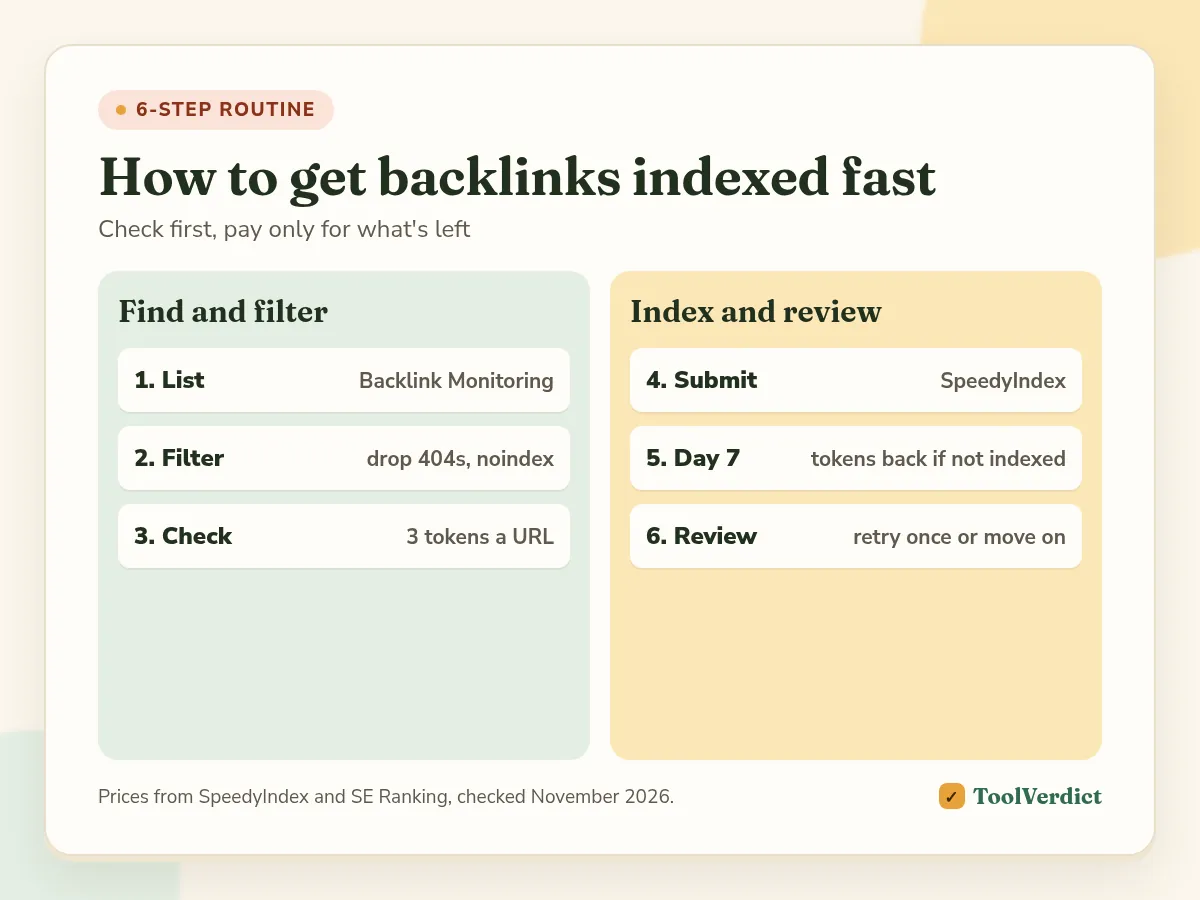
To get backlinks indexed fast, first find out which links are live and which linking pages are missing from Google (SE Ranking's Backlink Monitoring does both). Drop dead, blocked and noindex pages. Submit the rest to a pay-per-result indexer like SpeedyIndex: first results usually show in 48 to 72 hours, and tokens for anything not indexed by day 7 come back. Then re-check once and stop paying for pages Google won't keep.
Top picks
Prices checked November 2026
- Index them
SpeedyIndex
Get live backlinks on other sites indexed, pay per indexed link
Starts at $5 for 5,000 tokens (50 indexed links)
Get 200 free tokens - Find them first
SE Ranking
Find lost links and unindexed linking pages
Starts at Core $129/mo, 14-day free trial
Try free for 14 days
On this page
- Why your backlinks aren't indexed
- Step 1: List every link you placed
- Step 2: Check the link is live and indexable
- Step 3: Run an index check
- Step 4: Submit the rest to SpeedyIndex
- Step 5: Re-check on day 7
- Step 6: Decide what to do with the stragglers
- What a month of indexing costs
- Fast backlink indexing: what doesn't work
- How we wrote this guide
- FAQ
- The bottom line
Why your backlinks aren't indexed
A backlink only passes value if Google has the linking page in its index. Plenty of guest posts, niche edits and directory pages sit on pages Google found but never crawled, or crawled and chose not to keep. That's the same split you see in Search Console as "Discovered, currently not indexed" and "Crawled, currently not indexed".
You can't open Search Console on someone else's site, so the usual fix of Request Indexing isn't available. What you can control is which links you spend money on and how fast you get Googlebot to them.
Step 1: List every link you placed
Put all your new links in one place: the URL of the page with the link, the target URL and the date it went live. A sheet works. A tool that keeps checking works better, because links disappear and pages get noindexed after you've moved on.
In SE Ranking, add the pages to Backlink Monitoring by hand, import them from Google Search Console or pull them from its Backlink Checker.
Step 2: Check the link is live and indexable
Before you pay to index anything, make sure there's something worth indexing. Drop or chase any page that:
- returns 404, 403 or 5xx, or sits in a redirect loop
- has a
noindexmeta tag or is blocked in robots.txt - no longer has your link, or the link moved to a nofollow footer
- points its canonical to another URL
SE Ranking's Backlink Monitoring checks two statuses for each link: whether it's still on the page and whether that page is indexed in Google. It emails you when either changes. A link that's "not found" needs an email to the site owner, not an indexer.
Step 3: Run an index check
Some of your links will already be indexed. Don't pay to submit those. Check each linking page first:
- Manual: search Google for
site:plus the exact URL. Fine for five links, slow for fifty. - Bulk: SpeedyIndex's Google index checker costs 3 tokens per URL, so the $5 pack covers about 1,666 checks.
Keep only the pages that come back not indexed.
Step 4: Submit the rest to SpeedyIndex
This is the "fast" part. Paste the unindexed URLs into SpeedyIndex or upload a .txt file (one URL per line, up to 100,000 per file) and start a task. You don't need Search Console access to the site.
How you pay, from SpeedyIndex's site in November 2026:
| Pack | Price | Tokens | Indexed links |
|---|---|---|---|
| Start | $5 | 5,000 | 50 |
| Basic | $20 | 30,000 | 300 |
| Standart | $50 | 120,000 | 1,200 |
| Professional | $100 | 250,000 | 2,500 |
| Business | $250 | 700,000 | 7,000 |
| Enterprise | $500 | 1,500,000 | 15,000 |
One indexed Google link costs 100 tokens. Tokens are reserved when the task starts, and tokens for every URL not indexed by the day-7 report go back automatically. Dead, blocked and noindex URLs aren't refunded, which is why steps 2 and 3 come first. Tokens don't expire, and SpeedyIndex also takes crypto.
Submit your backlinks to SpeedyIndex, 200 free tokens
John F.: "I'd placed backlinks on other sites' pages and needed those pages indexed. I picked SpeedyIndex because the interface is simple. I use the web app for both the indexer and the index checker."
Step 5: Re-check on day 7
First results usually show in the dashboard after 48 to 72 hours, and the final report lands on day 7 with each URL marked indexed or not. Check your SE Ranking Backlink Monitoring at the same time so both tools agree.
Step 6: Decide what to do with the stragglers
Whatever is still out after a week is usually a page Google doesn't rate. You can:
- Resubmit once, if the page is decent and the refund came back. Your tokens returned, so the second try costs nothing extra if it fails again.
- Improve the page if you own or can edit it: more content, internal links from indexed pages on that site.
- Move on. A link on a page Google won't index isn't worth chasing. Put the budget into a better placement.
If the unindexed pages are on your own site, an indexer is the wrong first step. Read crawled or discovered, currently not indexed and fix the cause.
What a month of indexing costs
An illustrative example, not a test. You build 40 links a month. Two are lost or noindexed by the time you check (step 2, no cost). Index checks on the other 38 cost 114 tokens. Say 10 were already indexed, so you submit 28 and reserve 2,800 tokens. If 20 get indexed, 800 tokens come back.
Total: about 2,114 tokens, well inside the $5 Start pack. Without steps 2 and 3, you'd have paid for the dead links and the already-indexed ones too.
Fast backlink indexing: what doesn't work
- Pinging services and RSS submissions. Old tricks with no published results; we wouldn't pay for them.
- Tier-2 spam links pointing at your backlinks. That adds more pages Google ignores.
- The Google Indexing API. Google limits it to job posting and livestream pages, and you can only use it for sites you own.
- Indexers that charge per submission with no refund. You pay for the crawl whether Google keeps the page or not. Compare them in our best backlink indexer roundup.
How we wrote this guide
The routine comes from how John F. handles his own placements with SpeedyIndex. Prices and policies are from SpeedyIndex's site, FAQ and refund policy and SE Ranking's site, read in November 2026. The cost example is a calculation, not a measured test.
For a batch audit before submission, our bulk index checker guide explains report limitations and why a negative search check needs investigation.
Frequently asked questions
How long does it take for backlinks to get indexed?
Left alone, it can take weeks, and some pages never get indexed. With a pay-per-result indexer like SpeedyIndex, first results usually show in 48 to 72 hours and the final report comes on day 7.
Can I use Google Search Console to index backlinks?
Only for pages on sites you've verified. URL Inspection and Request Indexing work on your own property, so you can't use them for a guest post or a link on someone else's site.
How do I check if a backlink is indexed?
Search Google with site: plus the exact page URL, or run the page through an index checker. SpeedyIndex charges 3 tokens per Google check, and SE Ranking's Backlink Monitoring shows the index status of every linking page it tracks.
Why won't my backlink get indexed?
Usually the page is the problem: it's thin, duplicated, blocked by robots.txt, set to noindex, returns an error or the link was removed. No indexer fixes those. Google can also crawl a page and still decide not to keep it.
How much does it cost to index backlinks?
With SpeedyIndex, an indexed link costs 100 tokens: $0.10 on the $5 pack and about $0.033 on the $500 pack. Tokens for links not indexed by day 7 come back to your balance, and new accounts through our link get 200 free tokens.
The bottom line
Fast indexing is mostly about not wasting the first week. Check which links are live and unindexed, send only those to SpeedyIndex, and re-check on day 7.
Get 200 free SpeedyIndex tokens Monitor your backlinks with SE Ranking →
We may earn a commission if you buy through some links on this page. It doesn’t change our picks or verdicts. How we make money